Search has changed. The way your customers find businesses online is no longer just Google’s blue links. People are now asking ChatGPT for recommendations, using Perplexity to research, getting answers directly from Google AI Overviews, and increasingly trusting AI to make decisions for them.
The numbers prove it. AI search platforms sent 1.13 billion referral visits to websites in June 2025 alone – a 357% increase year-over-year, with ChatGPT driving 78% of that traffic. Pages cited in Google AI Overviews earn 35% more organic clicks than non-cited competitors. Even more importantly, visitors arriving from AI search convert at roughly 11 times the rate of traditional organic search traffic, and AI search traffic overall converts at 14.2% compared to Google’s 2.8%.
But here is the problem: most business websites are not built to be read by AI. They are built for humans, with marketing copy, animated graphics, and complex layouts that make them harder for AI systems to understand, parse, and cite accurately.
The good news is that fixing this is not hard. In this guide, we will show you the exact steps to make your website AI search ready in 2026 – the same process we use for our own clients at Rocket Agenc. Follow it yourself, or skip to the bottom and let us do it for you for free.
What Does “AI Search Ready” Actually Mean?
When someone asks ChatGPT “What is the best SEO agency in Chicago?”, a series of things happen behind the scenes:
- ChatGPT searches for relevant content across the web
- It crawls websites to find authoritative answers
- It synthesizes a response from the most trusted sources
- It cites the sources it used so the user can verify and click through
For your business to show up in that response, four things need to be true:
- AI crawlers need permission to read your site (controlled by robots.txt)
- AI systems need a map of what your site is about (provided by llms.txt)
- Your content needs structure that AI can understand (handled by schema markup)
- Your content needs to be cite-worthy (real information, real expertise, real data)
We will walk through each of these one by one.
Step 1: Give AI Crawlers Permission with a Modern robots.txt
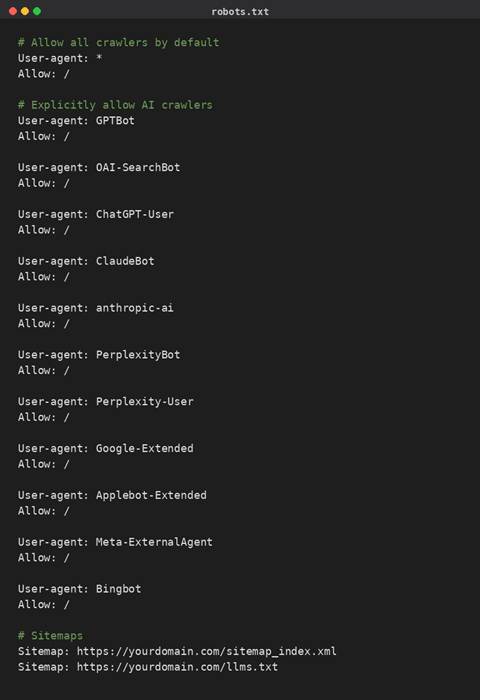
Every website has (or should have) a robots.txt file at its root. This file has been around since 1994, but in 2026 it has taken on new importance. It controls which AI crawlers can access your site – and most older robots.txt files were never updated to handle AI bots like GPTBot, ClaudeBot, PerplexityBot, and Google-Extended.
Why this matters
Some AI crawlers look for their own User-Agent name first before falling back to generic rules. If your robots.txt has not been updated, you may be accidentally limiting your AI visibility without realizing it.
What to check first
Visit yourdomain.com/robots.txt and look at what is there. If you see anything like “Disallow: /” under “User-agent: *”, or rules that only allow Googlebot and Bingbot specifically, your site may be invisible to AI search.
What a modern AI-friendly robots.txt looks like
Here is a complete template you can adapt for your site. Replace the domain in the Sitemap lines with your actual domain.
Where to put this on WordPress
If you use Yoast SEO, go to WordPress admin → Yoast SEO → Tools → File editor. You will see an option to create or edit your robots.txt file directly. Paste the code above, replace the domain, and save.
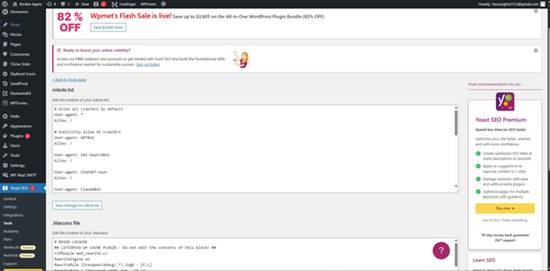
Yoast SEO Tools – File editor for robots.txt
If you do not see a File editor option, you may need to use a plugin like Virtual Robots.txt or edit the file directly through your hosting File Manager.
After saving, verify it is live by visiting yourdomain.com/robots.txt in your browser. You should see your new file content as plain text.
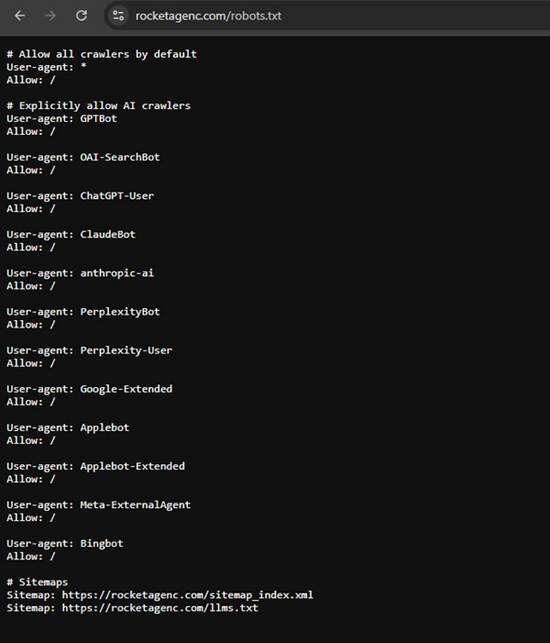
The new robots.txt live on rocketagenc.com
| Common mistake: Some businesses panic-block AI crawlers because they worry about content being scraped. Unless you are a major news publisher or content business, this is almost always a mistake. Invisibility hurts more than the theoretical concern about content use. |
Step 2: Create an llms.txt File
llms.txt is the newer file in this stack. It is a Markdown-formatted file that lives at yourdomain.com/llms.txt and serves as a curated guide for AI systems about what content on your site matters most.
Think of it like a sitemap, but specifically designed for large language models. Instead of just listing every URL, it provides a structured summary of your site with descriptions of your key pages – giving AI a fast, reliable shortcut to the most important content.
Why llms.txt matters in 2026
AI systems have limited context windows. They cannot read your entire website to answer a single question. The llms.txt file gives them a pre-curated reading list so they can quickly find the most relevant content for any query. This dramatically improves the chance of being cited accurately.
Adoption is still early – just over 2% of sites had a valid llms.txt file as of late 2025 – but that number is climbing fast. Being early gives you a meaningful visibility advantage.
What a good llms.txt file looks like
Easy ways to generate one
On Hostinger: WordPress admin → Hostinger → Tools → LLM Optimization → toggle on “Create LLMs.txt file.” Done in two clicks.
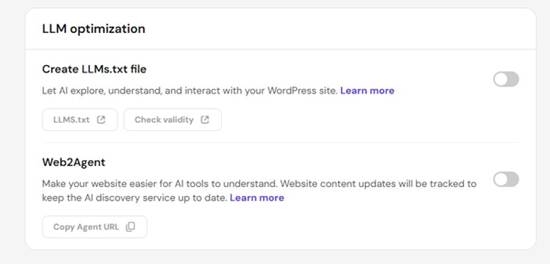
Hostinger LLM Optimization panel
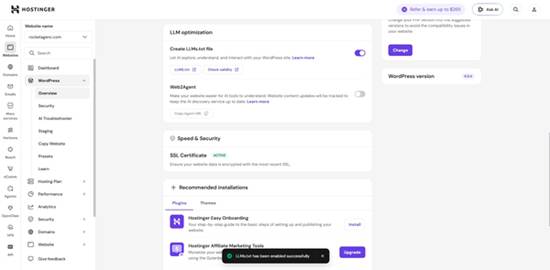
LLMs.txt successfully enabled
On other WordPress hosts: Install the free plugin “Website LLMs.txt” by Roel Magdaleno (30K+ active installs). Settings → LLMs.txt → choose your post types → click Generate.
For other platforms (Shopify, Wix, Squarespace, custom HTML): Use a free web tool like the Firecrawl llms.txt generator. Paste your URL, generate, then upload the file to your root directory via your hosting File Manager.
How to verify it is working
After creating the file, visit yourdomain.com/llms.txt in your browser. You should see the file content as plain text:
A live llms.txt file in the browser
Then run it through the free llmstxtvalidator.org tool to confirm the structure is valid:
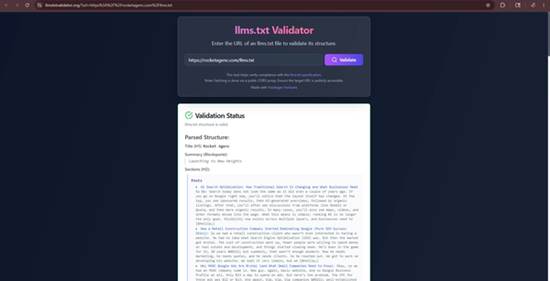
llms.txt validator showing the file passes
Finally, add the file to your sitemap reference in robots.txt (we showed this above) so AI crawlers know to look for it.
Step 3: Make Your Site Agent-Compatible with Web2Agent
If your website is hosted on Hostinger, you have access to a feature called Web2Agent – and it is one of the most underused tools in their entire platform.
What Web2Agent does
Web2Agent transforms your website into an AI-compatible “agent” using the MCP (Model Context Protocol). Once enabled, AI tools like Claude Desktop, Cursor, and any other MCP-compatible application can directly query your site’s content in real time.
Instead of an AI system having to crawl your site and guess at the structure, MCP lets it ask your site direct questions and get accurate, current answers – including content you have just updated.
How to enable it
- WordPress admin → Hostinger → Tools → LLM Optimization
- Toggle on Web2Agent
- Wait two to five minutes for the initial crawl
- Click “Copy Agent URL” and save that URL somewhere safe
That is it. The feature now runs automatically in the background. Any content you publish or update gets automatically synced to the AI representation.
How to test it
You can verify Web2Agent is working by connecting your Agent URL to Claude Desktop:
- Open Claude Desktop → Settings → Connectors → Add custom connector
- Name it after your business
- Paste your Agent URL (with https:// at the front)
- Save
Now start a new chat and ask Claude questions about your business. Claude will query your site directly through the connector and answer with live information from your pages.
| Not on Hostinger? Web2Agent is currently Hostinger-specific, though similar functionality is becoming available across other hosts. If your site is elsewhere, focus on the other steps in this guide – they cover most of the same ground. |
Step 4: Add Structured Data (JSON-LD Schema)
Structured data is invisible code on your website that explicitly tells search engines and AI systems what your content is. Without it, AI has to guess at the meaning of your content. With it, AI knows exactly what each piece of content represents.
For most business websites, the highest-impact schema types are:
- FAQ schema – wraps your frequently asked questions in structured data so AI can quote them directly
- LocalBusiness schema – formally identifies your business, address, hours, services, and service area
- Service schema – describes individual services in machine-readable format
- Article schema – for blog posts, helps AI understand the topic, author, and publication date
- Review schema – surfaces customer reviews in AI responses
A real example: FAQ schema
If your homepage has a FAQ section, you can wrap each question and answer in JSON-LD code that looks like this:
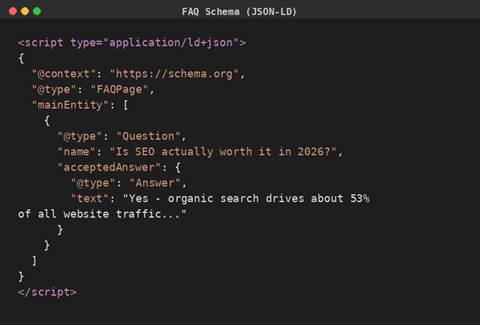
When ChatGPT, Claude, or Google AI Overviews encounter this code, they know with certainty which content on your page is a question and which is the answer. This dramatically increases the chance of your FAQ content being cited directly in AI responses.
How to add schema to your site
The cleanest way: Add the JSON-LD code into an HTML widget in your page builder (Elementor’s HTML widget, Divi’s Code module, etc.) and place it inside the relevant page section.
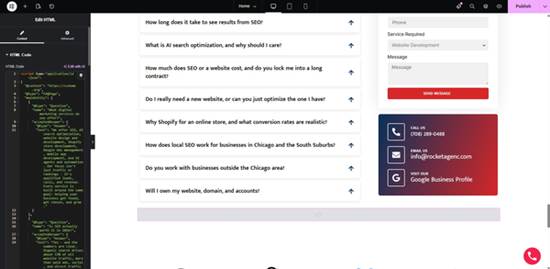
Pasting FAQ schema JSON-LD into an Elementor HTML widget
| Important rule: The schema content must match what is visible on the page word-for-word. Adding schema with information that does not appear on the page can be flagged by Google as misleading content. |
Test your schema
After implementing schema, verify it works using Google’s free Rich Results Test at search.google.com/test/rich-results. Paste your page URL and Google will tell you exactly which schema types it detected and whether they are valid.
Google Rich Results Test confirming 4 valid schema types including FAQ
Step 5: Audit Your Content for AI Cite-Worthiness
The technical setup gets you noticed. But getting cited requires content that AI systems actually want to reference. Here is what makes content cite-worthy:
Real numbers and specific data points. AI cites pages that contain factual claims it can verify. “We help businesses grow online” gets ignored. “Our typical clients see a 40% increase in qualified leads within six months” gets cited. Use real industry data, real statistics, real timelines.
Direct answers to specific questions. Structure content around questions your customers actually ask. Use those questions as headings (H2 or H3). Then answer them clearly in the first paragraph below.
Authoritative formatting. AI systems trust content with clear hierarchy, named sources, lists where appropriate, and dates. Add a “last updated” date to important pages. Cite your sources when you use statistics.
Honest, comprehensive coverage. AI tends to cite content that acknowledges complexity rather than oversimplifies. “SEO takes 3 to 6 months for early results, with stronger compounding gains between 6 and 12 months” gets cited more than “SEO works in 90 days.”
E-E-A-T signals. Especially for high-stakes topics where trust matters most, AI systems weight content from sources that demonstrate Experience, Expertise, Authoritativeness, and Trustworthiness. Author names, credentials, qualifications, and professional affiliations all matter.
Step 6: Submit Your Site for AI Indexing
Once everything above is in place, you want AI systems to actually find and index your new optimization work.
For Google AI Overviews:
- Submit your updated sitemap through Google Search Console
- Request indexing on key pages (homepage, service pages, FAQ pages)
- Wait. Indexing can take days to weeks depending on your site’s authority.
For ChatGPT, Claude, and Perplexity:
There is no direct “submit your site” form. These systems crawl the web continuously and update their representation of your site over time. The combination of llms.txt + robots.txt + good content does the work of telling them what to find.
You can speed this up by:
- Earning mentions on third-party sites (blogs, press, industry publications) – AI systems crawl those sites and follow links to yours
- Posting on social platforms that AI crawls (LinkedIn, Reddit, X) – these get cited heavily in AI responses
- Listing your business on directories that AI tools reference (Google Business Profile, Yelp, industry-specific listings)
How Long Does AI Visibility Take?
Honest answer: weeks to months, not days.
The technical infrastructure (steps 1 through 4) takes effect within a few days of implementation. Your robots.txt and llms.txt are read on the next crawl. Schema markup gets picked up by Google within a week or two.
But actual AI citation visibility builds slower. AI systems do not just read your site once and remember everything forever. They re-evaluate and rebuild their understanding of your business across thousands of crawls over time. Most businesses we work with start seeing measurable improvement in AI citations within 60 to 90 days of full implementation, with stronger effects compounding over six months.
Common Mistakes to Avoid
Blocking AI crawlers in robots.txt. Unless you have a specific reason, leave them allowed. Invisibility is worse than the theoretical content-use concern for most businesses.
Generic, fluff-heavy content. “We deliver innovative solutions for forward-thinking businesses” gets cited by no one. Replace marketing-speak with specific, factual information.
Schema that does not match visible content. Google can flag schema as misleading if it contains information that is not actually on the page. Always keep schema and visible content aligned word-for-word.
Leaving llms.txt empty or auto-generated without review. Plugin-generated llms.txt files are a great starting point, but they often include irrelevant pages or miss your most important ones. Review and customize.
Ignoring AI bot crawl logs. Once you implement, check whether AI bots are actually visiting your site. Tools like Cloudflare Analytics or server access logs can show you GPTBot, ClaudeBot, and PerplexityBot activity. If you are not seeing AI crawler hits after 30 days, something is wrong.
Want This Done For You – Free?
Look, we get it. This is a lot to manage on top of running your business. The technical work takes hours to set up correctly, and small mistakes can leave you worse off than when you started.
That is why we are offering this for free.
If you run a business website and want to be AI search ready, Rocket Agenc will do the entire implementation for you at no cost:
- Modern AI-friendly robots.txt configuration
- llms.txt file generation and customization
- Web2Agent setup (if you are on Hostinger) or equivalent
- FAQ schema markup on your homepage
- Validation that everything is working correctly through Google’s Rich Results Test and the llms.txt validator
No catch. No “free trial that converts to paid.” We do it once, you get the full benefit, and you walk away with everything intact whether you ever work with us again.
Why are we offering this for free? Two reasons. First, most businesses we meet have not done this yet, and we genuinely believe getting it right matters for the next few years of AI-driven discovery. Second, when we do good work for businesses, they tend to come back to us for the bigger SEO, web design, and AI search optimization projects that grow their visibility long-term.
Ready to get your site AI search ready?
Call Rocket Agenc or request a free consultation
We will audit your site, implement the entire AI-readiness stack, and give you a one-page report on what we did and what to expect.
TL;DR
To make your website AI search ready in 2026:
- Update robots.txt to explicitly allow GPTBot, ClaudeBot, PerplexityBot, Google-Extended, and other AI crawlers.
- Create an llms.txt file with a clear summary of your business and its key pages.
- Enable Web2Agent (or equivalent MCP integration) if your host supports it.
- Add structured data to key pages, starting with FAQ schema.
- Audit your content for real numbers, direct answers, and E-E-A-T signals.
- Submit your site for indexing and monitor AI crawler activity.
Or just contact Rocket Agenc and we will do it for your business for free. No obligations. No trying to tie you down into long term contracts.